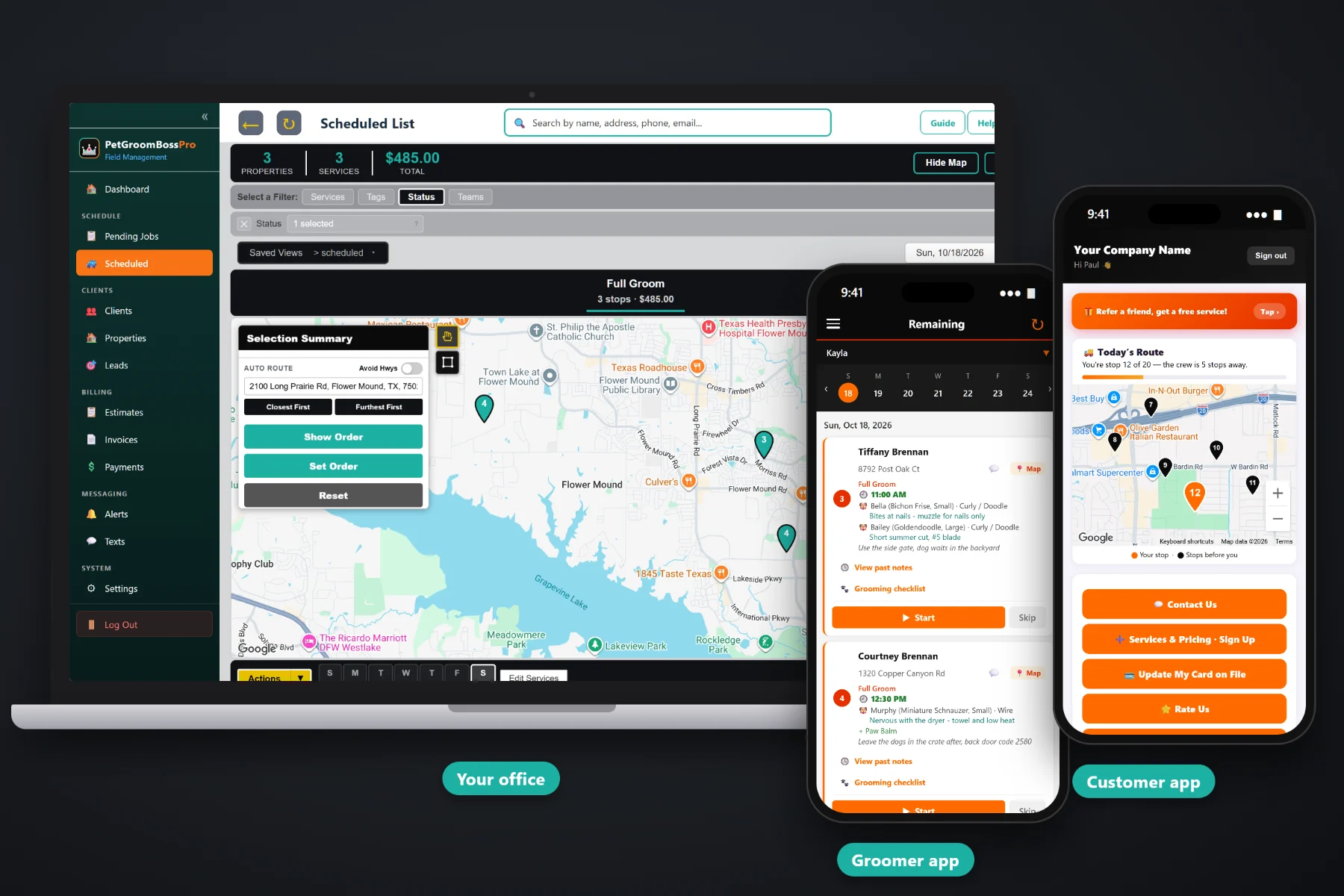
A mobile groom ends in a driveway, not at a front counter. There is no register, the customer may be at work, and the next appointment is already on the clock. PetGroomBossPro builds the invoice from the job — a line for each pet, a line for each add-on, sales tax figured for you — and can charge the card on file the moment the groomer taps Complete. Customers see invoices, pay and leave a tip in the customer app, and monthly accounts get one statement.
Plans start at $59/month, and invoicing, card on file, online payment and tips are part of every plan. They are not an add-on you buy later. To see how billing fits with the groomer app, routes, repeat appointments and online booking, start at PetGroomBossPro and then read the billing side here.
The invoice comes from the pets on the job, so a home with two dogs and a cat gets three clear lines instead of one mystery total.
Teeth brushing, nail grinding, de-shed, de-matting and the rest show as their own lines with your own prices.
Save the card once. Charge it when the groom is complete or on a schedule, without asking for it again at every visit.
Customers see their invoices, pay online and update their own card, so the office is not reading card numbers over the phone.
On a paid invoice the customer can tip $10, $20, $30 or another amount, and every app tip lands on the tips report.
Senior living communities, daycares and apartment pet days set to Monthly get one statement covering every visit that month.
Every job holds the pets at that home — up to four per visit — with breed, size and coat, plus the add-ons ticked on the job. When the groomer taps Complete, the invoice is built from that record. Nobody rebuilds the bill from memory at the end of the day, and the customer sees exactly what they paid for.
Groomers did not get into this work to chase invoices at night. PetGroomBossPro ties the bill to the job, so finishing the groom and billing for it are the same tap. The office spends its time on the few invoices that need a person, not on every one.
Build your service list with prices for full grooms, bath & brush, cat grooms, puppy intros and every add-on you offer, plus your sales tax.
Cards come in from the sign-up form, the customer app or the office, and stay on file for every repeat visit.
The groomer finishes, ticks the checklist and taps Complete. The invoice is created and the card on file can be charged right there.
Declines, no-card clients and monthly accounts show up for the office to handle. Customers can pay and tip in the customer app.
Most invoicing tools give you a blank bill and a total. A mobile grooming visit is a set of pets, each with its own size, coat and service, plus add-ons that change from visit to visit. A blank invoice leaves the groomer to rebuild all of that from memory.
Ask a mobile groomer how billing really goes and you will hear the same story: a payment app on one phone, prices in your head, a customer who was at work during the groom, and a stack of “I'll pay you Friday” that nobody wrote down. Whether the teeth brushing went on the bill. Whether the second dog was charged at the large-dog price. Whether the senior living community got billed for both visits last month.
That information belongs on the job, not in your memory at 9pm. When the invoice is built from the job, what was groomed is what gets billed, and the customer can see why.
PetGroomBossPro keeps the pets, the add-ons, the invoice, the card and the tip in one place, from the first booking request to the paid invoice.
Every tool here exists to get each groom billed correctly and paid before the van gets too far down the road.
Tapping Complete creates the invoice from the pets and add-ons on the job.
Each pet's service is its own line, so multi-pet homes get a bill that makes sense.
De-shed, teeth brushing, nail grinding, de-matting, flea & tick bath and any extra you set up.
Tax is figured on the invoice, so the groomer never does the math in the driveway.
Saved once and charged on later visits, at completion or on a schedule.
The card can be charged the moment the groom is done, before the van pulls away.
For clients you would rather bill later, charging can run on a schedule instead.
Customers get the invoice by email with your company details on it.
Customers see invoices, pay online and update their card on their own phone.
$10, $20, $30 or another amount, left by the customer in the app after paying.
Every app tip in one report, so you can see what came in and settle up with your team.
Unpaid invoices are easy to find and follow up by text or email.
Accounts set to Monthly get one statement for every visit in the month.
Bill customers in the US, Canada, Australia, New Zealand and the UK in their own currency.
See what was billed, what was paid and what is still outstanding.
Start $59, Pro $89 and Crew $199 per month, with billing on every plan.
The groomer's part of billing is one button. Tapping Complete on the groomer app creates the invoice from the job and can charge the card on file. The office sees paid invoices land, and only the exceptions need a person: a declined card, a client with no card, an account on a monthly statement. For the whole picture, from setting prices to the tips report, read Pet Grooming Invoicing: The Complete Guide to Billing, Tips and Payments for Mobile Groomers.
Plenty of grooming customers are at work when the van is in their driveway. The customer app lets them see the invoice, pay online, update an expired card and leave a tip for the groomer on a paid invoice, all without a phone call. The same app shows them the live route on service day and lets them choose their alerts, so the customer who gets the arrived text is also the one who gets the invoice.
Pick the plan that fits your vans. Every plan starts with a 14-day free trial and no credit card.
Compare plans on the pricing page.
From the job. Each job holds the pets at that home, up to four per visit, and the add-ons ticked on the job. When the groomer taps Complete in the groomer app, the invoice is created with line items for the services and add-ons, plus sales tax, at the prices on your own service list.
Yes. If the customer has a card on file, it can be charged when the groomer taps Complete, so the groom is paid before the van pulls out. If you would rather charge later, auto-charge can run on a schedule instead.
In the customer app. On a paid invoice the customer can pick $10, $20, $30 or enter another amount. App tips show on the tips report. How you share tips between a groomer and a bather is up to you; the software reports the tips, it does not split them.
The invoice stays unpaid so the office can see it. Text the customer, ask them to update their card in the customer app, and charge it again. Unpaid invoices are easy to follow up as past due.
Yes. Set the account to Monthly and it gets one statement each month covering every visit, instead of an invoice after each pet day.
Start is $59/month, Pro is $89/month, and Crew is $199/month. Invoicing, card on file, online payment and tips are on every plan, and every plan starts with a 14-day free trial with no credit card.
Billing is one piece of how PetGroomBossPro runs a mobile grooming business. For the groomer app, routes, repeat appointments, online booking and cat grooming, see the full PetGroomBossPro platform overview.
Practical reading on grooming invoices, line items per pet and add-on, sales tax, card on file, charging at completion, the customer app, tips and the tips report, declined cards, past-due follow-up, monthly statements and price changes.
Invoices built from the job, a line per pet and add-on, card on file charged at completion, online payment and tips in the customer app. Try PetGroomBossPro free for 14 days.