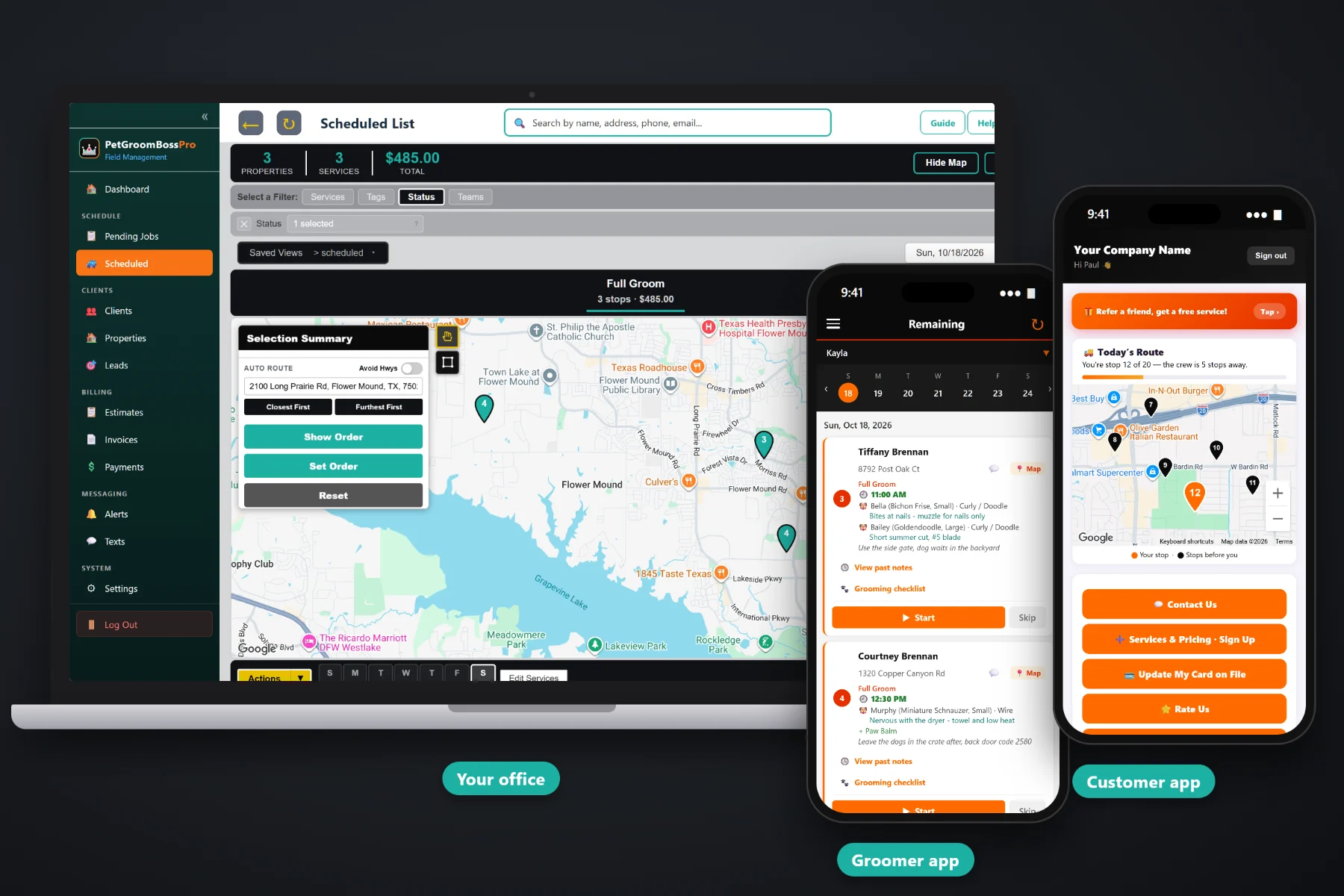
A mobile grooming day is a set of promises: a 9:00 doodle across town, a 10:30 cat who hates waiting, a nail trim squeezed in on the way, and a Great Dane who takes the whole afternoon. PetGroomBossPro puts every appointment on one schedule with its set time, its van and its pets, auto-routes the day Closest First or Furthest First from the shop, lets you set the order by hand, and confirms tomorrow's visits the day before from Pending Jobs.
Plans start at $59/month, and scheduling, routing and customer alerts come with every plan. To see how the schedule fits with the groomer app, repeat appointments, online booking and billing, start at PetGroomBossPro and then dig into the scheduling side here.
Each appointment carries its set time, so the groomer, the office and the pet owner all work from the same 9:00 or 1:30.
The Scheduled list shows each day's appointments, and a van filter shows just one van's day.
Closest First or Furthest First from your shop or home base, then adjust the order by hand where you need to.
Pending Jobs lines up tomorrow's repeat visits first. One click keeps each visit's planned day, time and van.
Night-before reminders, on-the-way and arrived texts. Pet owners choose which alerts they want.
Every van shows on the office map, and pet owners see their place in line on a live map.
A mobile groomer cannot just run the closest house next. Some owners need the van by 9:00 before work, some pets take three hours, and some stops are a ten-minute nail trim. PetGroomBossPro shows the set time, the pets, their size and coat, and the add-ons on every card, so the person building the day can see which stops are fixed and which can move.
Most mobile groomers build tomorrow tonight, between the last groom and dinner. PetGroomBossPro is set up for exactly that: tomorrow's repeat visits are already waiting with their planned time and van, new requests sit on their own tab, and routing takes a click.
Enter clients by hand or by CSV import. Imported addresses are placed on the map automatically. Set up your vans and the groomers and bathers who ride in them.
Add Recurring Grooming puts a client on the same weekday, time and van every 4, 6 or 8 weeks, or whatever schedule they pick.
The day before, open the tomorrow tab, confirm the visits, place any No Day requests, and auto-route or set the order.
Each groomer sees the day in order with set times, navigation and every pet on the card. Pet owners get their texts automatically.
A shop groomer schedules chairs. A mobile groomer schedules a van that has to drive between every appointment. A plain calendar shows the times but not the drive, the pets or the order, so the day gets built twice: once on the calendar and again on a map.
Ask a mobile groomer how the book really runs and you will hear the same story: a paper planner with arrows drawn between days, a 9:00 on one side of town followed by a 10:30 on the other, and a text thread where a customer moved her appointment and nobody wrote it down. The doodle that ran long. The nail trim that could have fit in on the way. The client who forgot it was grooming day and left for work with the dog inside.
That belongs on one schedule, with the time, the van and the pets on every stop. When it is, anyone in the business can see the day, and the groomer stops rebuilding it from memory each morning.
PetGroomBossPro keeps the appointment, the route, the pets and the customer in one place, from the first booking request to the paid invoice.
Every tool here exists to get a van through a full day of appointments on time, with less driving and fewer phone calls.
Every card shows its set time, on the office schedule and on the groomer's phone.
Each day's appointments in one list, filtered by van when you want one van's day.
Closest First or Furthest First from the shop, in one click.
Move a stop up or down when a time, a pet or a parking spot says so.
Planned repeat visits and new requests on a map and list, with day tabs, tomorrow first.
New requests without a day wait here until you place them.
Same weekday, time and van every week, 2, 3, 4, 6 or 8 weeks, monthly or custom days.
Open the schedule filtered and sorted the way you use it.
Print the day for a van, with the stops in order.
Sent automatically by text and email, for pet owners who want them.
The groomer app sends these on its own as the groomer works the route.
Every van on the office map, so you know who is closest.
In the customer app: "You're stop 4 of 6 — the groomer is 2 stops away."
A groomer and a bather can share a van, and each van has its own day.
Senior living, daycare and apartment community days, billed on one monthly statement.
Start $59, Pro $89 and Crew $199 per month, with scheduling on every plan.
Repeat clients are written up front on Pending Jobs with their planned day, time and van. New requests from the Book Now page and the request form arrive too, and the ones without a day wait on the No Day tab. The day before, the office confirms tomorrow, places the new requests, auto-routes from the shop or sets the order by hand, and the groomer's phone shows the same order with the same times. For the full walkthrough, read Mobile Grooming Scheduling Software: The Complete Guide to Running a Van's Day.
A mobile groom only works if the pet is there and the owner knows it is grooming day. Automatic reminders the night before, on-the-way and arrived texts as the groomer works the route, and a live map in the customer app tell the owner when to expect the van. Replies come back to the office through two-way texting, and after the groom the invoice, online payment and tipping are in the customer app.
Pick the plan that fits your operation. Every plan starts with a 14-day free trial and no credit card.
Compare plans on the pricing page.
Yes. Each job carries its appointment time, and the time shows on the office schedule and on the groomer's phone. Repeat clients keep the same weekday, time and van on every visit unless you change it.
On the Scheduled list you can auto-route a van's day Closest First or Furthest First from your shop, or set the route order by hand. Most groomers auto-route first, then move the stops with fixed early or late times into place.
A map and list of planned repeat visits and new requests, with day tabs that start with tomorrow. The office confirms tomorrow's visits the day before. One click keeps each visit's planned day, time and van. New requests without a day sit on the No Day tab.
No. A Book Now booking is a request. It lands in Leads with the pets, service, add-ons, preferred day and time of day, and the quoted price. The office confirms the time with the customer and books it, so nothing lands on the day that the groomer cannot fit.
Yes. Each van has its own day, the Scheduled list filters by van, and every van shows on the office map. A groomer and a bather can share a van as one team.
Start is $59/month, Pro is $89/month, and Crew is $199/month. Scheduling, routing and customer alerts are on every plan, and every plan starts with a 14-day free trial with no credit card.
Scheduling is one piece of how PetGroomBossPro runs a mobile grooming business. For the groomer app, pet records, repeat appointments, online booking and billing, see the full PetGroomBossPro platform overview.
Practical reading on appointment times, the Scheduled list, auto-routing, Pending Jobs, new requests, rescheduling, reminders and texts, van GPS, route sheets, running two vans, long grooms and quick trims, monthly account days and weather days.
Appointment times on every card, routes built in a click, tomorrow confirmed the day before, and pet owners told when the van is coming. Try PetGroomBossPro free for 14 days.